Login to Internet banking
A brand-new experience - smarter, faster, and secured






You gain a dedicated partner committed to helping you reach your full potential and achieve new heights
Know More

BRAVO (Auto Sweep)
Convert the idle funds in your current account into a fixed deposit with the BRAVO feature.
Know More
Zero Forex Markup Current Account
Maximise your savings and boost profitability with our Zero Forex Markup current accounts
Know More






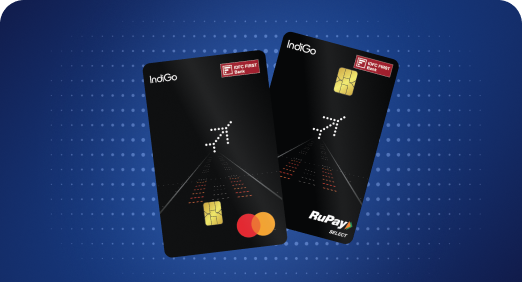


A Card that Powers your Savings & Lifestyle
IDFC FIRST Bank HPCL Credit Card









Most Searched
Earn up to 7% interest on your Savings Account
Open Account Now
Download our app
Get instant help for all your queries in one place
Unlock features, exclusively available
only on the IDFC FIRST Bank app
Trusted by 1.2+ million Indians.


4.8

4.8

Tools & Calculators
Privilege Program



Tools & Calculators

Unlock features, exclusively available
only on the IDFC FIRST Bank app

For excess payment refunds to existing IDFC FIRST Bank accounts or for amounts less than Rs. 5k, please call 1800-10-888. To receive an excess payment refund exceeding Rs. 5k to an account other than an IDFC FIRST Bank Savings Account, please send a copy of the bank statement.
IDFC FIRST Bank offers various payment options to pay your credit card bills.
Click here to Pay Now
You can also pay your credit bill through the following options:
To know more about the options click here.
Yes, IDFC FIRST Bank gives its credit card holders the choice to pay their dues through cheque or by cash. Cash deposits can be made into your credit card account at any IDFC FIRST Bank branch along with your name and card number. To find your nearest branch click here.
Customers can drop a cheque drawn in favour of the 16 - digit IDFC FIRST Bank Credit Card number i.e. “IDFC FIRST Bank Credit Card XXXXXXXXXXXXXXXX” at any IDFC FIRST Bank branch/ATM. To find the nearest branch/ATM click here.
Yes, IDFC FIRST Bank gives its credit card holders the option to pay their dues through IMPS/NEFT. Use the following details to pay:
Follow the below mentioned steps to enable the auto-debit facility on your credit card
Cardholders can modify any standing instructions by logging into their IDFC FIRST Bank Internet/ Mobile Banking account:
Click here to login
Please note the turnaround time for varied modes of payments below:
BHIM/UPI - Instant
IMPS, Bill Desk & Auto Debit - Payment gets credited on the payment due date and it will reflect instantly in Card account / IDFC bank application / net banking
Cash Payment - Instant
NEFT/RTGS - 30 min to 1 working day
IDFC FIRST Bank cheques - 1 working day
Visa Money Transfer, PSP Apps (e.g. PayTM, Cred, Phonepe, Google Pay etc.) - Within 3 working days
For other bank cheques - 4 working days based on the realization
Alternatively, it can be checked through the IDFC FIRST Bank mobile app Net banking under credit card transactions
For any further assistance, you can reach out to us on the 24/7 toll free number mentioned on our website: https://www.idfcfirst.bank.in

Should you take a personal loan if you already have existing EMIs? How to calculate your affordability
Updated on 22 Jun 2026 | 5 mins read
Personal loan for self-employed: How your GST number gets you funded faster
Updated on 22 Jun 2026 | 5 mins read
How to get the lowest personal loan interest rates for urgent approval within 24-48 hours in India
Updated on 22 Jun 2026 | 5 mins read
Looking to plan a holiday for your parents? A personal loan can make it easier
Updated on 18 Jun 2026 | 5 mins read
First time taking a personal loan in India? Here’s a simple step-by-step guide
Updated on 17 Jun 2026 | 5 mins read
CIBIL score for personal loan: What can an excellent score do for you?
Updated on 16 Jun 2026 | 5 mins read